If you want to know how to teach AI in school, start with ideas before tools: show students how a machine learns from examples, let them train a tiny model themselves, then ask who could be harmed when it gets things wrong. You do not need a GPU lab or a computer science degree. You need a clear term plan, a few free browser tools and the confidence to say "let's test it" in front of a class.
That matters right now because the AI curriculum in Pakistan is moving from news headlines into school timetables. Federal, Punjab, Khyber Pakhtunkhwa and Sindh authorities have all announced AI lessons or AI training for teachers. Many of the teachers expected to deliver those lessons have never been shown how. This guide gives you a 12-week plan you can adapt for Grades 6 to 12, with lesson ideas, low-cost activities, a simple way to assess students and the mistakes to avoid in your first term.
Why Is the AI Curriculum in Pakistan Arriving Now?
The short answer is policy. In July 2025, the federal cabinet approved the National AI Policy, which aims to train one million AI professionals by 2030 and offer 3,000 AI scholarships a year, according to Arab News. Schools are where that pipeline begins, so the provinces and the federal government have started moving.
Here is what has been announced so far, region by region:
- Federal schools (Islamabad): Business Recorder reported in July 2025 that an AI curriculum was launched for Grades 6 to 12 in federal schools, with more than 1,000 teachers trained at that point and a national target of preparing 10,000 AI trainers.
- Khyber Pakhtunkhwa: Daily Times reported in January 2026 that KP planned AI classes for Grades 6 to 12 from March 2026, with 35 to 50 percent AI content across those grades and plans to hire 7,555 IT teachers. The same report noted that the existing computer science curriculum had no AI content at all.
- Punjab: Eduvision reported in September 2026 that Punjab launched an initiative to give AI training to 160,000 teachers, linked to a planned AI curriculum for Class 1 to Class 12, with UNICEF among the partners.
- Sindh: The News reported that 3,503 teachers and officials completed an AI-powered teacher training programme run with UNICEF and Khan Academy Pakistan, and 91 percent of them passed.
Notice a pattern. The announcements are big, and each one assumes teachers already know how to teach AI. Yet the details on what happens inside a single classroom on a Tuesday morning are thin. Most reports do not spell out lesson content, weekly time or assessment. That gap is where a well-prepared teacher makes the difference.

What Does "Teaching AI" Actually Mean?
When people hear "AI lessons", some imagine students chatting with a chatbot for forty minutes. That is using AI, not learning about it. AI literacy for students means they can explain, in their own words, how an AI system gets its answers, where it fails and what choices humans made along the way.
Before you plan how to teach AI, pin down what students should be able to do. Two respected frameworks help, and both are free to read.
The five big ideas from AI4K12
The AI4K12 initiative, started in the US in 2018, organises AI learning around five big ideas: perception, representation and reasoning, learning, natural interaction, and societal impact, as the Raspberry Pi Foundation explains. It sets outcomes for four age bands (5–8, 9–11, 12–14 and 15–18), so you can match depth to your class. Its authors also favour a "glass-box" approach, where students see how a system works inside rather than only watching inputs and outputs.
UNESCO's competency frameworks
UNESCO released two frameworks during Digital Learning Week 2024. The student framework has four competencies: a human-centred mindset, ethics of AI, AI techniques and applications, and AI system design. The teacher framework adds AI pedagogy and AI for professional development, for five areas in total.
Put together, these give you a simple test for any lesson: does it help students understand how AI works, use it thoughtfully, or judge its effect on people? If a lesson does none of those, it is a typing exercise with a chatbot.
How to Teach AI in a 12-Week Term: The Plan
The plan below assumes one or two lessons a week of 40 to 45 minutes, which fits a typical computer period. It moves from concrete to abstract, and from using to building to judging. Each block ends with something students can show.
| Weeks | Big question | Main activity | Students produce |
|---|---|---|---|
| 1–2 | What is AI, and where is it already? | AI hunt: spot AI in phones, apps and shops | A class "AI around us" poster |
| 3–5 | How does a machine learn? | Sort-by-rules game, then train an image model | A working classifier and a test log |
| 6–7 | Why does AI get things wrong? | Feed the model biased data on purpose | A short "what went wrong" report |
| 8–9 | How do chatbots produce answers? | Predict-the-next-word game, fact-checking task | A checked answer with sources |
| 10–11 | Who is affected, and who decides? | Role-play a school AI decision | A group policy for safe AI use |
| 12 | Can we build something useful? | Mini project and showcase | A demo and a one-page reflection |
Treat this as a skeleton for your AI lesson plans, not a script. If your province issues its own scheme of work, map these blocks onto it. The ideas transfer even when the chapter names change.

Weeks 1–2: Start With AI Students Already Use
The easiest way to start is with what is familiar. Ask students to list every time something "decided" for them in the last day: the next video on YouTube, a filter on a photo, a spam folder, a map that rerouted a rickshaw ride. Then sort the list into "AI" and "not AI" and argue about the borderline cases.
This debate does real work. Students discover that AI is not one thing. It is a family of methods that turn data into predictions. By the end of week two, every student should be able to finish this sentence: "An AI system makes a guess based on patterns in examples it has seen."
Keep the vocabulary short at this stage. Five words are enough: data, pattern, prediction, training and accuracy. Put them on the wall and use them every lesson.
Weeks 3–5: Let Students Train a Model Themselves
This block is the heart of the term, and it is where most classes come alive. If you remember one thing about how to teach AI, make it this: students learn most when they train a model with their own hands. Do it in two steps.
Step one: an unplugged rules game
- Give groups a pile of paper cards showing fruit, or local items like different coins.
- Ask them to write rules that sort the cards, such as "if it is round and orange, it is an orange".
- Swap rule sheets between groups and test them on new cards.
- Count how often the rules fail, then discuss why writing rules for everything is so hard.
Students quickly hit the wall that early AI researchers hit. The real world has too many exceptions to write down. That sets up the next step perfectly.
Step two: train an image model with Teachable Machine
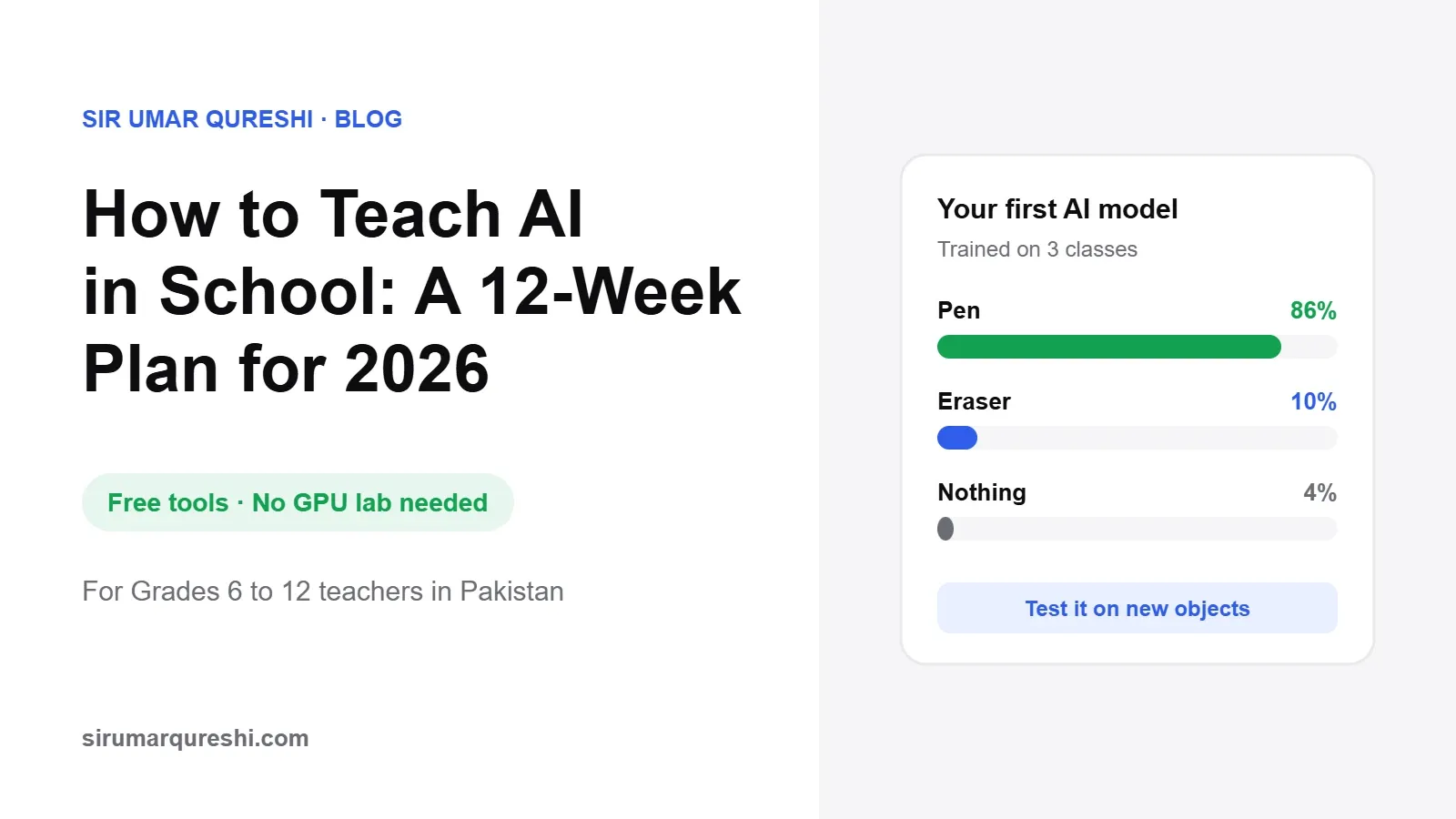
Google's free Teachable Machine trains models on images, sounds or body poses with no coding required, and the training examples stay on the device unless you choose to save the project to Google Drive. That privacy point matters when you use a school webcam.
- Open Teachable Machine in a browser and choose an image project.
- Create two or three classes, for example "pen", "eraser" and "nothing".
- Record 30 to 50 examples per class using the webcam.
- Click train, then test with objects the model has never seen.
- Students record every test in a table: what they showed, what the model guessed, right or wrong.
The test log is the assessment, not the model. A student who writes "it fails when the pen is under bright light because all my training photos were taken in shade" has learned more than one who just got high accuracy.
Tip for low-resource labs: If you have one working computer and a projector, run Teachable Machine as a whole-class demo. Students come up in turns to add examples and test the model. You lose some hands-on time, but the thinking is the same.
Weeks 6–7: Teach Bias by Breaking the Model
AI ethics for students lands best when they cause the problem themselves. It is also the part of how to teach AI that many courses skip. Ask one group to retrain their model with deliberately lopsided data, such as 50 photos of blue pens and only five of black pens. Then test both colours.
The model will usually favour what it saw most. Now connect that to the real world. Ask: what if a face recognition system saw mostly one skin tone during training? What if a loan app learned only from city customers? Students do not need statistics to grasp the point. They have just watched it happen on their own screen.
Code.org's free How AI Works series has nine short videos for Grades 6 to 12, including one on training data and bias, plus seven ready lessons. Show the bias video after the activity, not before, so it confirms what students found rather than telling them what to think.
Weeks 8–9: How Do Chatbots Come Up With Answers?
By now students have trained a classifier, so this is the right moment to tackle chatbots. Chatbots feel different, but the core idea is related: a large language model predicts likely next words based on patterns in huge amounts of text.
Try a predict-the-next-word game. Read the start of a sentence in English or Urdu, such as "Chai ke saath sab se achha lagta hai…", and let the class guess the next word. Write the guesses and tally them. The most common guess wins. That is a rough, human version of what a language model does at enormous scale.
Then run a fact-checking task. Give students a chatbot answer to a local question, such as the history of their city or a school subject topic, and ask them to verify three claims using a textbook or a reliable website. They will usually find at least one claim that is vague, outdated or wrong. That single lesson does more for safe AI use than any warning poster.
For classroom chatbot use, follow your school's rules on accounts and age limits. If students cannot have accounts, you can run the chatbot from the teacher's screen and let the class direct the prompts. Our guide to AI tools for teachers and students compares the main options.
Weeks 10–11: Who Decides How AI Is Used?
The societal impact idea from AI4K12 and the human-centred mindset from UNESCO both point to the same skill: judging when AI should and should not be used.
A role-play works well here. Present a scenario: "The school wants to use an AI camera to mark attendance." Assign roles such as principal, parent, student, teacher and IT vendor. Each group prepares two arguments and one question. Then hold a short hearing and vote.
Finish the block by asking the class to write a one-page "AI use agreement" for their own classroom. When students write the rules, they tend to follow them. Typical points include: say when you used AI, check facts before submitting, never upload a classmate's photo, and keep your own thinking in your own words.
Week 12: A Mini Project Students Can Show
Close the term with a small build. Keep the scope tight so every group finishes. Good options include:
- Recycling sorter: an image model that tells plastic from paper, tested on 20 new items.
- Sound alarm: a Teachable Machine sound model that recognises a clap or a whistle.
- Pose coach: a model that tells "standing straight" from "slouching" at a desk.
- Chatbot audit: ten questions asked to a chatbot, every answer checked and graded.
Older students who know some programming can go further. Teachable Machine models can be exported for use in websites through TensorFlow.js, so a Grade 11 or 12 student could embed their model in a simple web page. If your students are ready for code, our 30-day Python plan is a sensible next step after this term.
Hold a showcase in the last lesson. Each group demos for two minutes and answers one question from the class: "When does your model fail?" A group that can answer that honestly has met the goal of the course.
How Should You Assess AI Lessons?
Knowing how to teach AI also means knowing how to check that it worked. Avoid written tests that ask students to define "neural network" from memory. They reward cramming, not understanding. A short rubric works better, scored on four criteria:
| Criterion | Beginning (1) | Developing (2) | Secure (3) |
|---|---|---|---|
| Explains how the model learns | Says "it just knows" | Mentions examples or data | Links training data to specific predictions |
| Tests and records results | Few or no tests | Tests, but no pattern noted | Spots when and why it fails |
| Identifies risks and bias | No risks named | Names a general risk | Names who could be harmed and how |
| Uses AI responsibly | Copies output unchecked | Checks some facts | Checks, cites and declares AI use |
This rubric lines up with the student competencies in UNESCO's framework and works for any grade. You simply expect deeper answers from older classes.
What If Your School Has No Lab or Internet?
This is the real question for many teachers who want to learn how to teach AI in an ordinary government school. The KP report itself noted a large shortfall of IT labs in the province. Do not let that stop you. A large share of this plan runs without any device:
- The rules game, AI hunt, bias discussion, next-word game and role-play are all unplugged.
- One teacher phone and a projector or even a printed screenshot can carry a demo.
- Teachable Machine runs in a browser, so a single shared laptop works for turn-taking.
- Watch the Code.org videos yourself on a good connection, then summarise them on the board for classes without internet.
Plan your term with the unplugged lessons in weeks when the lab is busy, and save the hands-on blocks for when you can book devices.
Teacher AI Training: How Should You Prepare Yourself?
You do not need to become an engineer to learn how to teach AI well. You need to stay one or two lessons ahead and be honest when a student asks something you cannot answer. "Let's test it" is a perfectly good teaching move in an AI class.
Here is a sensible preparation order:
- Read the AI4K12 big ideas and the UNESCO teacher framework summary. Together they take less than an hour.
- Train three Teachable Machine models yourself before you show students: images, sounds and poses.
- Watch the full Code.org How AI Works series and note which videos fit which week.
- Join any official training your province offers. Punjab, Sindh and the federal government have all run or announced teacher AI training programmes.
- Practise explaining one idea, such as training data, to a family member with no tech background.
Sindh's programme is a useful model of what support can look like. According to The News, it ran fully online in 88 cohorts with about seven hours of live sessions per cohort, four weeks of self-paced learning, and WhatsApp groups for peer support. You can build a similar peer group with colleagues at your own school or cluster.
Teachers often make strong learners of technology, because explaining something forces you to understand it. We wrote more about that in learning by teaching.
Common Pitfalls in the First Term
When teachers first work out how to teach AI, most problems come from a handful of predictable choices. Watch for these:
- Starting with the chatbot. Students then think AI means "a website that answers". Start with training a model instead.
- Too much vocabulary. A wall of terms like transformer, parameter and token loses younger classes. Five core words will carry a whole term.
- Skipping the failure cases. A model that works perfectly teaches little. Always test with new, tricky examples.
- Treating ethics as a lecture. Let students cause bias and then discuss it. Experience beats a slide.
- Ignoring privacy. Do not upload student photos to tools that store them. Check where data goes before each lesson.
- Grading the output only. Reward the test log and the reflection, not just a working model.
A Realistic Example: One Computer Teacher, One Term
The school and teacher below are invented for illustration. Imagine a computer teacher at a government middle school with one lab of 15 working PCs, shared between two sections of Grade 8. She has two 40-minute periods a week.
She runs weeks 1 and 2 entirely unplugged while the lab is booked for exams. In weeks 3 to 5 she pairs students two to a PC for Teachable Machine. Her internet drops twice, so she switches those lessons to the card-sorting game and a projector demo from her phone hotspot. For the bias block, she prepares the lopsided dataset herself to save time. In week 12, each pair presents a model and a test log. She grades with the four-row rubric and finds that the students who struggled with typing still scored well on explaining failure cases.
The lesson from this scenario is simple, and it applies to anyone working out how to teach AI with limited resources. A tight plan with unplugged backups survives real school conditions far better than an ambitious plan that needs every device working.
Where to Go From Here
You now know how to teach AI with a structure that moves from familiar examples to hands-on training, then to bias, chatbots and real decisions. The tools are free, and most of the plan works even in a lab with few computers.
Your action for this week: open Teachable Machine, train a three-class image model with objects on your desk, and test it with ten items it has never seen. Write down every failure. That 20-minute exercise will give you the first lesson of your term and the confidence to run it.
If your school or academy wants help with AI lesson plans, designing an AI module or training a group of teachers, see the courses on the teaching page or get in touch. You can also explore the PSTA academy platform, built for running courses online.