
The honest answer to polars vs pandas in 2026 is this: learn pandas first if you are new to data analysis, then add Polars once your files get big or your scripts get slow. Both libraries shipped major versions this year, so the gap between them is now smaller in some places and wider in others.
pandas 3.0 arrived in January with a new string type and safer copying rules. Polars 2.0 followed in October and made its fast streaming engine the default for lazy queries. If you learned either library from a tutorial written before 2026, some of what you know is now out of date. This guide explains what changed, how the two compare on speed and syntax, and which one deserves your next month of practice.
I teach programming and I also write production code, so I'll give you both views: what works in a classroom and what holds up in a real project.
What Changed in 2026? pandas 3.0 and Polars 2.0
Two big releases landed within the same year. Each one fixed long-standing complaints about its library, and each one can break old code if you upgrade without reading the notes.
pandas 3.0 (January 2026)
According to the official pandas 3.0.0 release notes, the new version came out on January 21, 2026 and needs Python 3.11 or newer. The headline changes for everyday users are:
- A real string type. Text columns are now inferred as
strinstead of the old catch-allobjecttype. - Copy-on-Write is the only mode. Any result of an indexing step now behaves like a copy. The confusing
SettingWithCopyWarningis gone, and chained assignment such asdf["foo"][mask] = 100no longer changes your data. - A new
pd.col()syntax. You can writedf.assign(c=pd.col("a") + pd.col("b"))instead of a lambda. - Better Arrow support. DataFrames can now be exchanged with other Arrow-based tools through the Arrow PyCapsule interface.
The pandas 3.0 announcement also recommends installing pyarrow next to pandas, because the new string type uses it for speed when it is available. It is optional, not required.
Polars 2.0 (October 2026)
Polars 2.0.0 was published on October 6, 2026, according to the package release history on piwheels. The Polars 2.0 upgrade guide lists the changes. The ones that matter most for learners are:
- Lazy queries use the streaming engine by default. This is the engine that topped the Polars team's own benchmarks (more on that below).
- Row order is not guaranteed for operations that don't need it. If order matters, you must sort or ask for it.
- String-to-date casts were removed. You now use
str.to_date()orstr.to_datetime()instead. - Headerless CSV files now get column names starting at
column_0, notcolumn_1.
Watch out after upgrading to Polars 2.0: a script that "worked" may now return rows in a different order without any error. If you compare outputs, export to Excel or take the "first" row of a result, add an explicit .sort() first.
How Are Polars and Pandas Different Under the Hood?
The syntax looks similar at first glance. Each is a Python DataFrame library that gives you tables with named columns. The design underneath is quite different, and that design explains almost every difference you will feel in practice.
The Polars "Coming from pandas" guide sums up the main contrasts:
- No index in Polars. pandas labels every row with an index. Polars identifies rows only by their position. Beginners often find this easier, because there is no
reset_index()to forget. - Memory format. Polars stores data in the Apache Arrow format. pandas traditionally uses NumPy arrays, although it can now use Arrow too.
- Threads. Polars is written in Rust and spreads work across your CPU cores. The core of pandas is single-threaded.
- Lazy evaluation. pandas runs each line as soon as you write it. Polars can also build a query plan first, optimise it, and then run it all at once.
- Expressions. Polars is built around expressions like
pl.col("amount").sum(). pandas relies more on methods and Python lambdas. - Missing values. Polars uses
nullfor missing data in every column type. pandas often turns an integer column with gaps into floats filled withNaN.
A simple way to picture it: pandas is like doing a task step by step at your desk. Polars is like handing a full to-do list to a team, who first reorder it to skip wasted work and then split it among themselves.
Is Polars Really Faster Than Pandas?
Yes, usually by a wide margin on larger data, but read the numbers with care. The most quoted figures come from the PDS-H benchmark published by the Polars team in June 2025. It runs a set of business-style queries derived from the TPC-H standard.
At scale factor 10 (roughly 10 GB of CSV data), the total run times were:
| Tool (version tested) | Total time (s) | Times slower than fastest |
|---|---|---|
| Polars, streaming engine (1.30) | 3.89 | 1.0 |
| DuckDB (1.3) | 5.87 | 1.5 |
| Polars, in-memory engine (1.30) | 9.68 | 2.5 |
| Dask (2025.5.1) | 46.02 | 11.8 |
| PySpark (4.0) | 120.11 | 30.9 |
| pandas (2.2.3) | 365.71 | 94.0 |
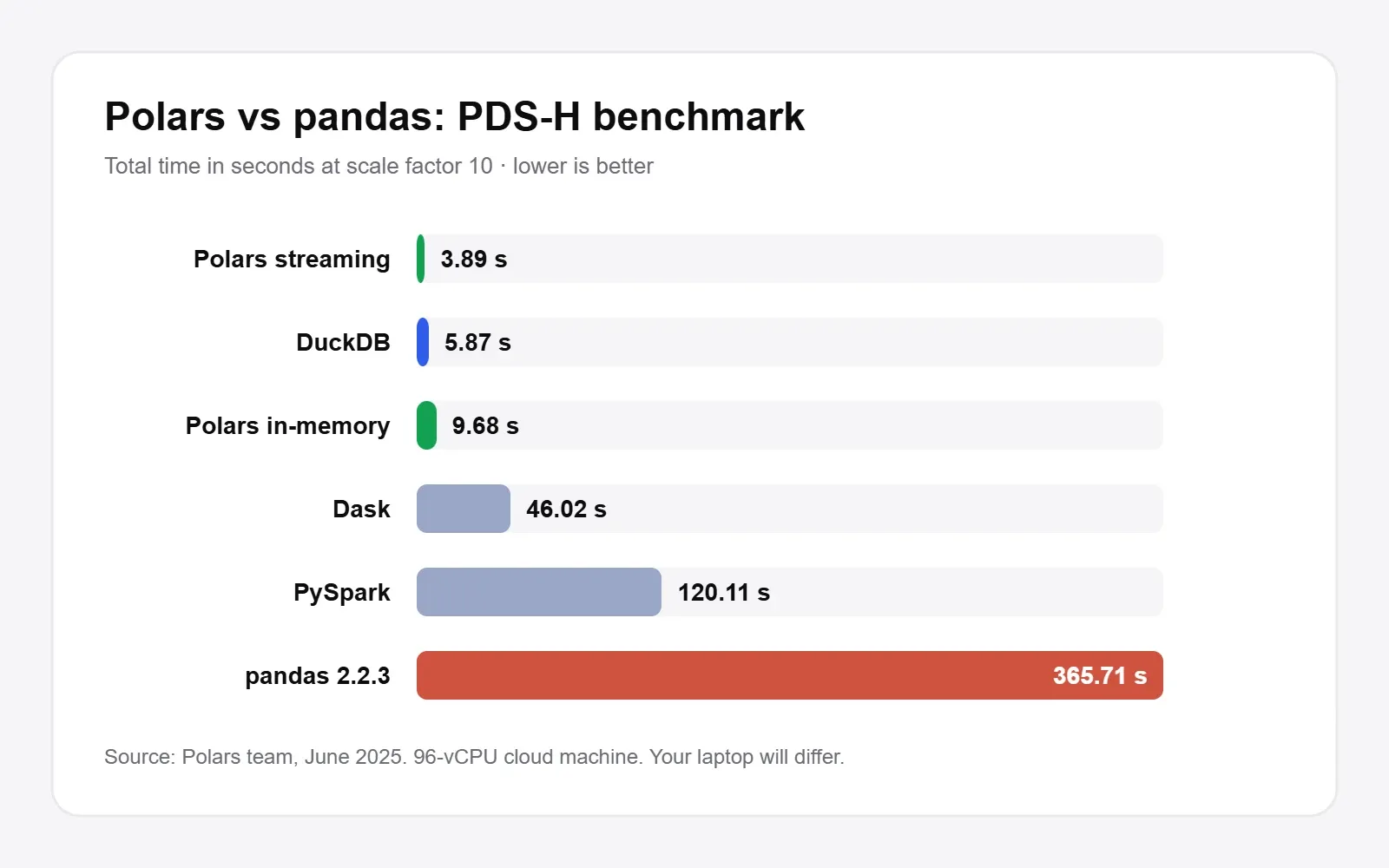
Before you quote "94 times faster" in a WhatsApp group, keep four caveats in mind:
- The Polars team ran it, on a large cloud machine with 96 virtual CPUs and 192 GB of memory. Your laptop has far fewer cores, so the gap will be smaller.
- It tested pandas 2.2.3, not pandas 3.0, with PyArrow types and Copy-on-Write turned on.
- pandas was only run at scale factor 10, because it ran out of memory at larger sizes.
- The post itself says results vary with use case and hardware.
So what does this polars vs pandas speed gap mean for you? On a 5 MB class dataset, both libraries finish before you can blink, and speed is not a reason to choose. On a 2 GB sales export from a shop's database, pandas may freeze your machine while Polars finishes comfortably. Speed starts to matter once your data stops fitting easily in memory.
Polars vs Pandas Side by Side: The Same Task in Both
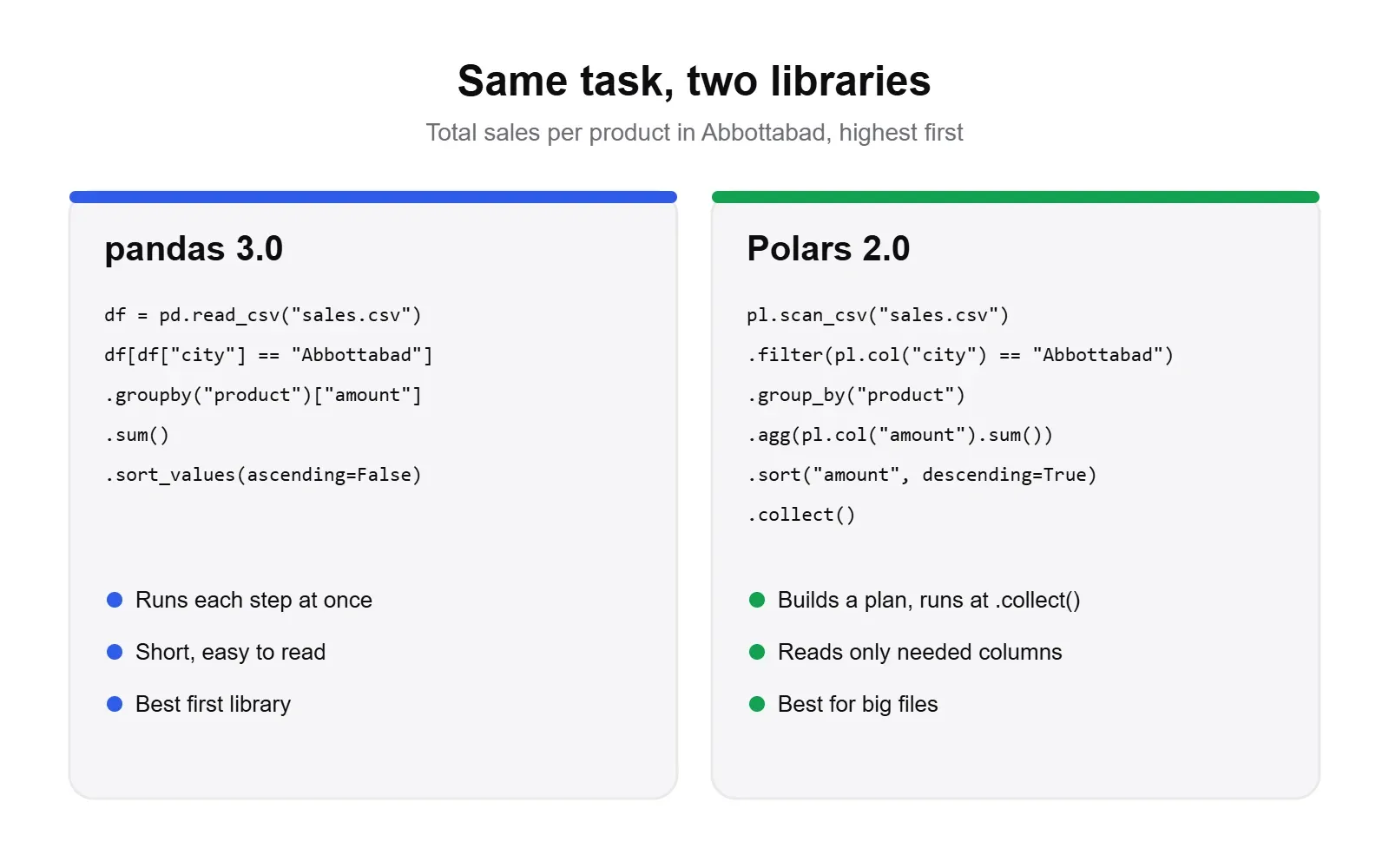
Let's take one realistic task. You have a sales.csv file with city, product and amount columns. You want total sales per product in Abbottabad, highest first.
In pandas
import pandas as pd

df = pd.read_csv("sales.csv")
result = (
    df[df["city"] == "Abbottabad"]
    .groupby("product", as_index=False)["amount"].sum()
    .sort_values("amount", ascending=False)
)
In Polars
import polars as pl

result = (
    pl.scan_csv("sales.csv")
    .filter(pl.col("city") == "Abbottabad")
    .group_by("product")
    .agg(pl.col("amount").sum())
    .sort("amount", descending=True)
    .collect()
)
Notice three things. First, Polars uses scan_csv instead of read_csv. That builds a lazy plan, so Polars can read only the three columns it needs and filter rows while reading. Second, every column operation goes through pl.col(). Third, nothing runs until .collect(). That is the Polars lazy API at work.
The pandas version is shorter and reads almost like English, which is why it is easier to teach in week one. The Polars version is more explicit, and that explicitness is what lets it optimise your query.
Here is a quick translation list for the moves you will use most:
- Pick columns:
df[["a", "b"]]becomesdf.select("a", "b") - Filter rows:
df[df["a"] < 10]becomesdf.filter(pl.col("a") < 10) - Add a column:
df.assign(...)becomesdf.with_columns(...) - Group and sum:
df.groupby("id").sum()becomesdf.group_by("id").agg(pl.col("v").sum()) - Group-wise value on every row: pandas
transformbecomes a window expression with.over("id")
Polars vs Pandas Comparison Table
This polars vs pandas table puts the practical differences in one place. It reflects pandas 3.0 and Polars 2.0.
| What you care about | pandas 3.0 | Polars 2.0 |
|---|---|---|
| Ease for a first-week beginner | Easier, very short syntax | A little more to learn (expressions, lazy mode) |
| Speed on large files | Single-threaded core | Multi-threaded, streaming by default for lazy queries |
| Data bigger than memory | Struggles; often needs another tool | Streaming engine can process it in batches |
| Row index | Yes, labelled index | No index, rows by position |
| Missing values | NaN and others, depending on type |
null for every type |
| Tutorials, courses and Stack Overflow answers | Huge library built up over many years | Growing, but much smaller |
| Works with scikit-learn | Native | Yes, transformers can output Polars (since scikit-learn 1.4) |
| Breaking changes this year | Copy-on-Write, str type, Python 3.11+ |
Streaming default, row order, removed casts |
The scikit-learn point is worth knowing. Since scikit-learn 1.4, you can call set_output(transform="polars") on transformers, so Polars no longer locks you out of machine learning work.
Which Should a Beginner Learn First?
My advice as a teacher is simple: start with pandas, then learn Polars as your second library. Here is why, especially if your goal is to learn pandas for data analysis jobs.
pandas is still the standard most learners meet first. In the Python Developers Survey run by JetBrains and the Python Software Foundation, 77% of respondents doing data exploration and processing said they use pandas. The same report gives Polars 10%, though that figure comes from the earlier 2023 survey, so the two numbers are not a perfect match. Either way, most notebooks, courses and colleagues you meet will use pandas.
That matters more than speed when you are learning. When you get stuck at midnight, you want an answer that already exists online. You also want to read other people's notebooks on Kaggle or GitHub, and most of those are written in pandas.
There is one exception. If you already know SQL well, Polars may feel more natural than pandas. Its select, filter, group_by and agg steps map closely to SQL clauses, and there is no index to confuse you.
If you are starting from zero, follow the order in my 30-day Python plan for beginners first. Learn core Python before either library. Then use the wider data science roadmap to see where DataFrames fit among SQL, statistics and machine learning.
When Is pandas Still the Better Choice?
pandas is not the "old, slow" option you should drop. For many jobs it remains the right tool:
- Small and medium data. Under a few hundred MB, the speed difference rarely matters, and pandas code is quicker to write.
- Time series work. Its labelled index makes resampling and date-based slicing very convenient.
- Existing projects. If your team already has pandas code that works, a rewrite costs time and adds risk.
- Libraries that expect pandas. Many plotting, statistics and finance packages were built around pandas first.
- Teaching and quick analysis. For exploring a file in a notebook, pandas is hard to beat.
pandas 3.0 also removed one of the biggest beginner headaches. With Copy-on-Write as the only mode, you no longer have to guess whether you changed a view or a copy. The safe pattern is now always one step: df.loc[df["bar"] > 5, "foo"] = 100.
When Should You Reach for Polars?
Switch to Polars, or add it beside pandas, when you notice any of these signs:
- Your script takes minutes, and you run it every day.
- Loading a CSV or Excel export makes your laptop freeze or crash with a memory error.
- You build data pipelines for a website or app, where speed and predictable memory use matter.
- You process many files in a folder and want to treat them as one dataset.
- You prefer a strict, SQL-like style that makes each step clear.
As a developer, I find the pipeline case the strongest. On a platform such as an online marketplace (think of something like OnePlace), background data jobs often share a server with the website itself. A tool that reads only the columns it needs and processes data in streams keeps those jobs from eating the memory your visitors need.
If your interest is dashboards rather than code, you may not need either library yet. My Power BI vs Excel guide covers that route.
How Do You Move From pandas to Polars Without Breaking Things?
You don't need to rewrite everything at once. The Polars team's August 2026 article on pandas to Polars migration strategies describes three paths: migrate one slow section, migrate a whole pipeline by hand, or use an AI assistant to translate code against your tests. For most learners and small teams, the first path is the safest. Here is how to do it:
- Find the slow part. Time each step of your script. Usually one join or group-by eats most of the time.
- Save a test case. Store a small input file and the expected output for that step, so you can compare results later.
- Convert at the edges. Turn your pandas DataFrame into Polars with
pl.from_pandas(df).lazy(), run the step, then convert back with.collect().to_pandas(). - Rewrite the step with expressions. Avoid copying pandas habits such as row loops or
applywith a lambda. Usepl.col()expressions instead. - Check the tricky differences. The migration article warns about missing indexes,
NaNversusnull, date units and time zones, and row order. - Measure again. Compare run time and peak memory before and after. Keep the change only if it really helps.
- Grow slowly. Once neighbouring steps are verified, chain them as one lazy query and call
.collect()once at the end.
Tip: because Polars uses the Arrow format, converting to and from pandas is often cheap, especially when pandas also uses Arrow. The Polars team still advises measuring it on your own data, because some column types force a copy.
What About Data Jobs and Freelancing in Pakistan?
If you are learning for a job or for freelance work from Pakistan, think about what clients and employers will hand you. In most cases it will be existing notebooks, CSV exports and Excel files. That code is usually pandas, so pandas fluency is the safer first skill to show on your CV.
Polars then becomes a way to stand out. A portfolio project that shows "this report took several minutes in pandas, and I rewrote the slow step in Polars" tells an employer you can measure, improve and explain your work. That is a stronger signal than listing ten libraries.
Here are three portfolio ideas that use both libraries:
- Sales report rebuild. Take a public retail dataset, build the report in pandas, then rewrite the slowest step in Polars and record the timing.
- Many-file cleaner. Combine a folder of monthly CSV exports into one clean file with
pl.scan_csv("data/*.csv"). - Before-and-after notebook. Show the same analysis in both libraries side by side, with a short note on which you would choose and why.
For freelancing basics such as profiles, pricing and payments, see my step-by-step freelancing guide. If you want structured lessons, you can see what I teach on the teaching page.
A Realistic 4-Week Plan to Learn Both
You don't have to settle the polars vs pandas question forever. A better plan is to learn them in order, with a clear goal for each week. This plan assumes about one hour a day and that you already know basic Python.
- Week 1: pandas basics. Load CSV and Excel files, inspect them with
head(),info()anddescribe(), select columns, filter rows and sort. Finish the week by answering five questions about one dataset. - Week 2: pandas for real reports. Practise
groupby,merge, handling missing values and working with dates. Use the pandas 3.0 habits from the start: one-step.locassignments and the newstrtype. Build one small report you could send to a manager. - Week 3: Polars expressions. Redo your week 2 report in Polars, using eager mode first with
pl.read_csv(). Focus onselect,filter,with_columns,group_byandagg. Write down every place where the two libraries behaved differently. - Week 4: lazy mode and a speed test. Switch the Polars version to
scan_csvand.collect(). Find or create a larger file, time both versions and publish the notebook on GitHub with a short write-up.
By the end, you will know pandas well enough for most entry-level tasks and Polars well enough to use it when speed matters. More importantly, you will have evidence of your own instead of opinions from a forum.
If you also work with spreadsheets every day, keep your Excel skills sharp alongside this plan. Many analysts in offices still receive data as Excel files first, and my list of Excel formulas every job needs covers the ones that come up most.
Common Mistakes When Comparing the Two
These errors come up again and again when people compare the two libraries:
- Testing speed on tiny data. A 1,000-row file tells you nothing. Test with data close to your real size.
- Writing pandas-style Polars. Using
map_elementsor Python loops throws away most of the speed. Learn the expression API instead. - Forgetting
.collect(). A lazy query does nothing until you collect it. New users often print a plan and think the result is wrong. - Following old tutorials. Code using
SettingWithCopyWarningtricks in pandas, or string-to-date casts in Polars, is now outdated. - Thinking you must pick only one. Many working analysts use both. Polars for heavy lifting and pandas for the last mile is a perfectly normal setup.
Your One Step This Week
Pick one dataset you already know, ideally something from your own work or studies. Write the same small analysis twice: once in pandas and once in Polars using scan_csv and .collect(). Time both, and write three lines about which felt clearer to you.
That single exercise will teach you more about polars vs pandas than any benchmark chart. If you want help choosing a learning path, or you need a data pipeline built for your business, send me a message and tell me what you are working on.